DG Pro: bookings, clients and job reports for service businesses

Let your clients book and manage their own jobs online, see every job in one calendar and send professional quotes and job reports, without the phone calls and missed details.

Made for
  • Cleaning and housekeeping
  • Property services and maintenance
  • Holiday rental turnovers
  • Non-technical teams
DG Pro on desktop and phone

What changes with DG Pro

Today: Booking requests arrive by phone, WhatsApp and email, and details get lost

With DG Pro: Clients book online in their own portal, with every detail captured in a structured form.

Today: Arrivals, departures and jobs live in different calendars

With DG Pro: Bookings, check-ins and check-outs sit in one calendar, pushed to Google Calendar for your team.

Today: Clients call the office to check, change or cancel a booking

With DG Pro: Clients check, edit or cancel their own bookings online, within the rules you set.

Today: Quotes and job reports take time to put together and do not look professional

With DG Pro: Quotes go out as branded PDFs, and job reports include notes and up to 6 photos.

Main features

Everything runs in one place: a back office for your team and a portal for your clients, in English and Spanish.

Client portal

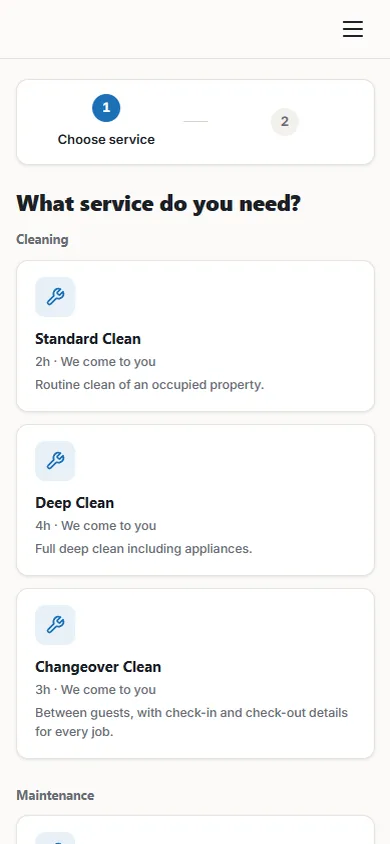
Your clients book, change and cancel their own jobs, so fewer calls reach the office.
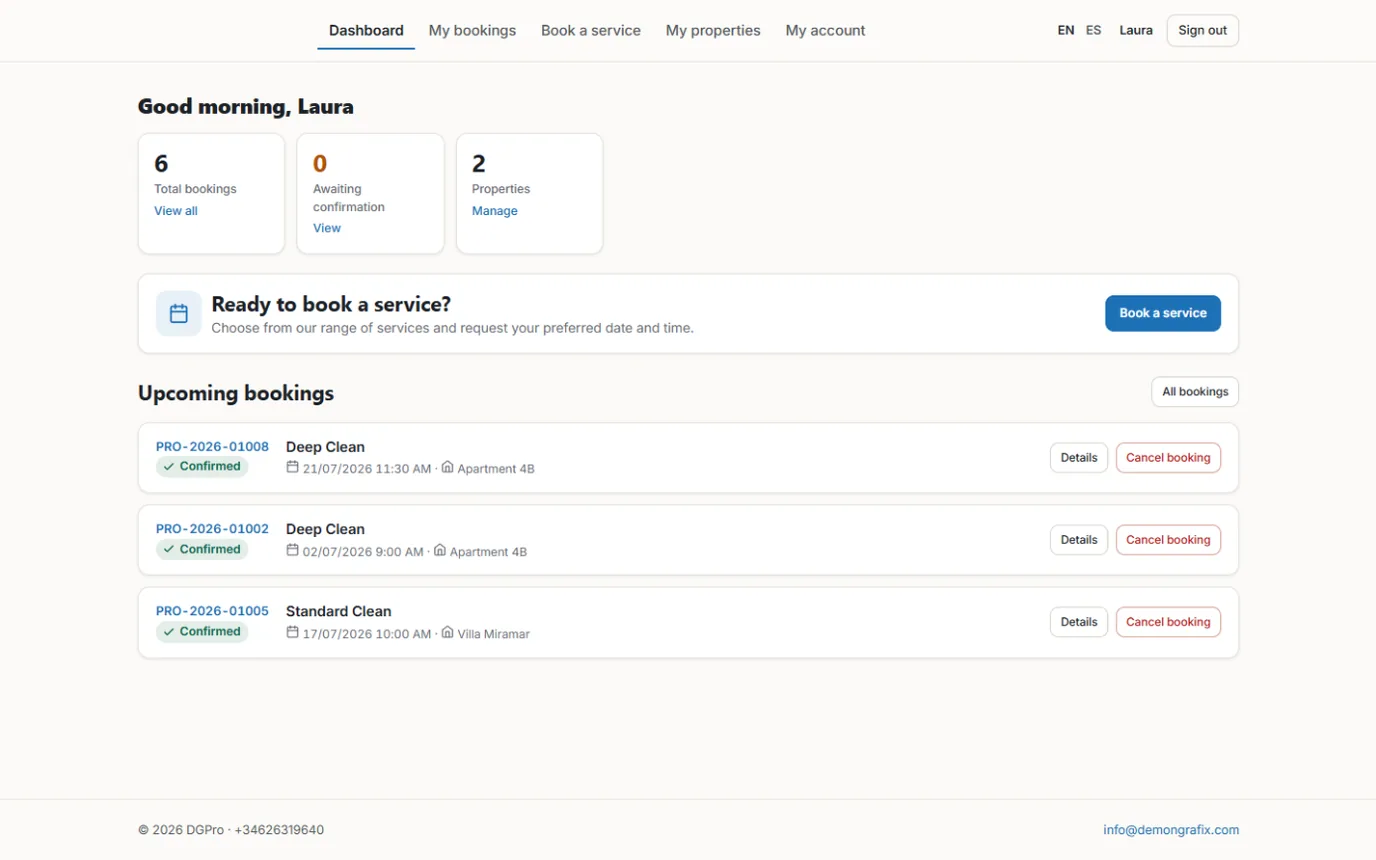
  • Clients create bookings and manage several properties
  • Clients edit or cancel their own bookings within your rules
  • Your team can open the portal as a client to help someone on the phone
DG Pro: client portal

Bookings and scheduling

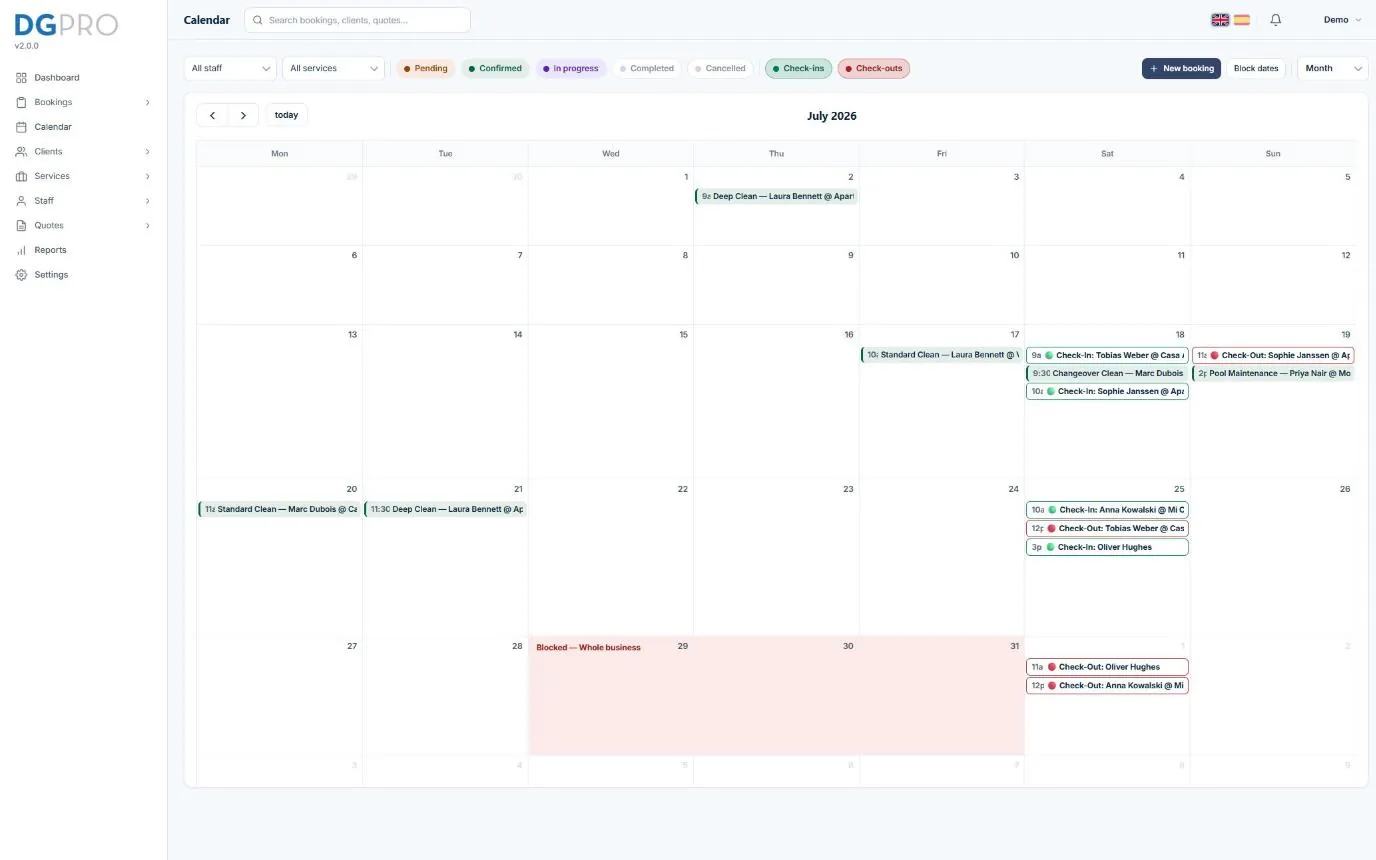
Every job in one calendar, with clear statuses and staff who only see their own work.
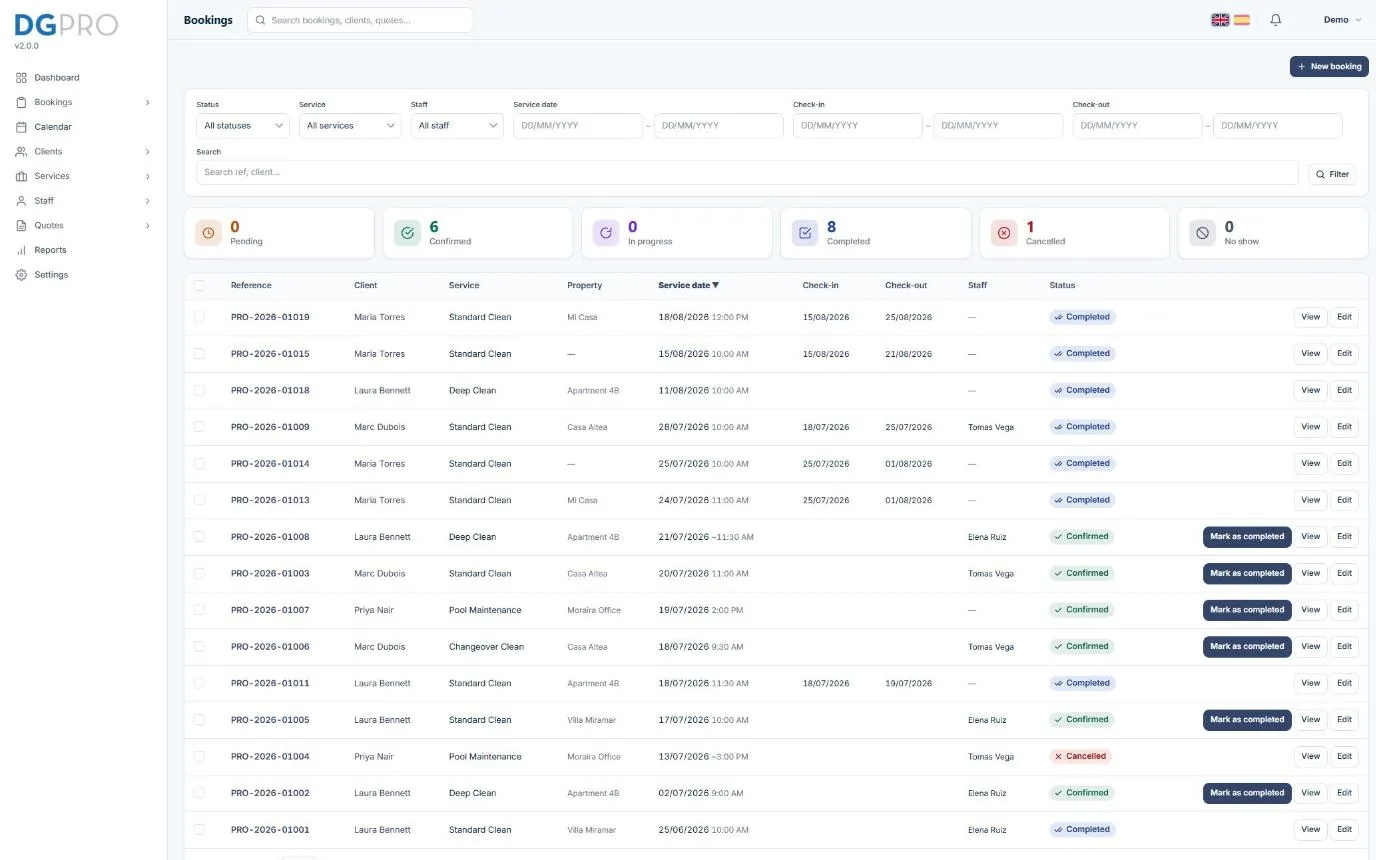
  • Bookings with clear, colour-coded statuses: pending, confirmed, completed, cancelled and no show
  • Calendar with filters and drag-and-drop rescheduling
  • Assign staff to each job; staff only see their own work
DG Pro: bookings and scheduling

Quotes and job reports

Professional quotes and job reports with photos, without exposing key-box or alarm codes.
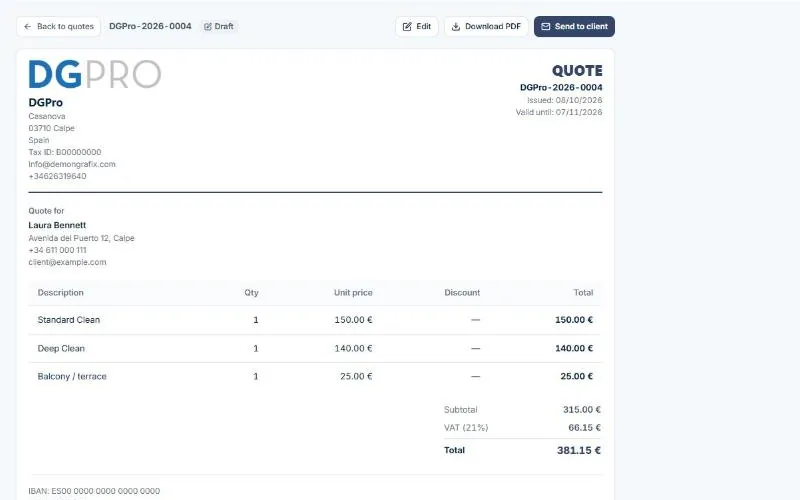
  • Quotes with line items, discounts and VAT, sent as a PDF
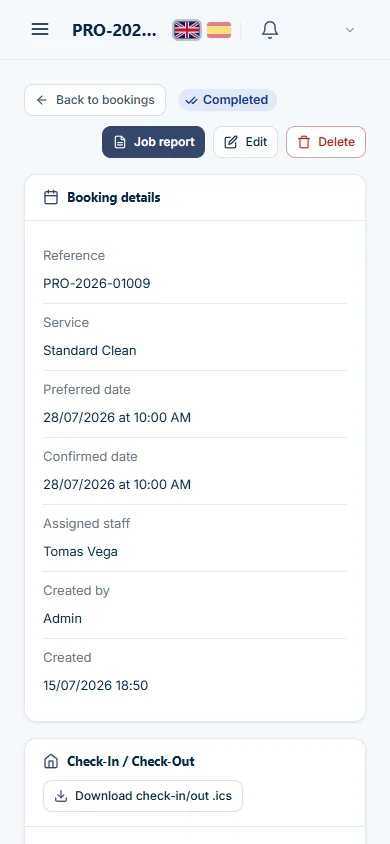
  • Job reports for completed work with notes and up to 6 photos
  • Job reports never show key-box codes, alarm codes or internal notes
DG Pro: quotes and job reports

All features

Bookings and scheduling

  • Bookings with clear, colour-coded statuses: pending, confirmed, completed, cancelled and no show
  • Optional admin confirmation, per service or for everything
  • Calendar with filters and drag-and-drop rescheduling
  • Block dates when you are not available
  • Booking windows and cancellation policy per service
  • Assign staff to each job; staff only see their own work

Client portal

  • Clients create bookings and manage several properties
  • Clients edit or cancel their own bookings within your rules
  • Card and list views with filters, search and sorting
  • Calendar file for each booking, ready for Google, Apple or Outlook
  • Your team can open the portal as a client to help someone on the phone

Services, extras and custom forms

  • Service categories, services and optional extras
  • Custom add-on forms with text, date, number, choice and checkbox fields
  • Built-in check-in and check-out form: guest name, phone, dates, times, guests and rooms
  • Fixed or hourly pricing per service and extra, with discounts

Quotes and job reports

  • Quotes with line items, discounts and VAT, sent as a PDF
  • Quote statuses: draft, sent, accepted and declined
  • Job reports for completed work with notes and up to 6 photos
  • Job reports never show key-box codes, alarm codes or internal notes

Emails and reminders

  • Editable email templates for created, confirmed, changed and cancelled bookings
  • Changes are highlighted, so clients see exactly what moved
  • Automatic check-in reminders for guests
  • Send through your own email account, with an email log

Calendars and maps

  • Jobs pushed to Google Calendar, including separate check-in and check-out events
  • Subscribable calendar feeds for bookings and check-ins
  • Google Maps for property locations

Clients, team and reporting

  • Client records for private and company clients, with CSV import and export
  • Admin, staff and client roles with detailed permissions
  • Dashboard with bookings over time, status mix and the next 14 days of work
  • Your logo, colours and font

Data, security and GDPR

  • Backup and restore of everything in a single file
  • GDPR export, erasure and consent tools
  • Activity log, login protection and encrypted stored credentials
  • Every word on screen can be adjusted, in English and Spanish

What it means for your business

Fewer calls, fewer missed details

Clients book and manage their own jobs online, with every detail captured in a structured form.

Every job in one calendar

Bookings, check-ins and check-outs in one place, synced to the calendars your team already uses.

Look professional

Branded quotes and job reports with photos, and clear emails that tell clients exactly what changed.

How we set it up with you

Step 1: Consultation

We look at how you work today and check that the product fits. If it does not, we tell you, and suggest what would.

Step 2: Set up for you

We install it on your own domain, add your branding, import your existing data and adjust the settings and wording to your business.

Step 3: Training and after-sales

We show your team how it works, keep it updated and stay on hand for questions and changes.

Questions we are often asked

Is DG Pro a WordPress plugin?

No. DG Pro is a standalone web application installed on your own domain. It works alongside your website, whichever platform it uses.

Can my clients use it without help?

Yes. It was designed for clients and staff who are not technical, and your team can open the portal as a client to guide someone by phone.

Does it work in Spanish?

Yes. DG Pro is fully available in English and Spanish, and you can adjust any wording to suit your business.

Can you adapt it to how we work?

Yes. During setup we configure services, extras, forms, emails and permissions around your process, and we can build additions if you need them.

How much does it cost?

It depends on your setup. After a short call we send a written quote that covers installation, setup and ongoing support.

See if DG Pro fits your business

Tell us how you take bookings today. We reply within 1 business day.

Request a demo

Tell us when suits you and we’ll walk you through it. We confirm the time by email or WhatsApp.

This site is protected by reCAPTCHA and the Google Privacy Policy and Terms of Service apply.

Book a 20-minute call

Tell us when suits you and we’ll call you. We confirm the time by email or WhatsApp.

This site is protected by reCAPTCHA and the Google Privacy Policy and Terms of Service apply.